100%
GRIMOIRE
GrimoireDindon CorpusSynthesis VolumesThe Foundation of Iron
FRENAR
HUMAN
STRUCTURAL STUDY · OPÉRATION DINDON · JUNE 2026
◆◆◆
THE BODY
THAT MAKES
From LED to Matter
Arduino · Laser · CNC · 3D Printer in the Educational Arsenal
◆ POSITION OF THIS STUDY

This study is the direct continuation of "Deamputation at the Source". The Arduino in secondary school was the first contact — code that controls an electrical signal. This study proposes the second level: code that creates matter. Laser, CNC, 3D printer — three machines, one continuous thread with the Arduino. And an annual project: building the machine itself, to understand what it is before programming it.

◆◆◆
MACHINES
3
AGE
11-18
YEARS
BUDGET
€1,080
OF €2,400
WATERMARK
HUMAN
Amine RAITI — Infrastructure Architect & SRE
Former engineering school professor · Teaching since 2006
Public document · CC BY-NC-SA 4.0 · Opération Dindon · June 2026
HUMAN
1
SECTION 1 · THE COMPLETE CAUSAL CHAIN
FROM LED TO MATTER — ONE CONTINUOUS THREAD

"Deamputation at the Source" established the Arduino as first contact — code that controls an electrical signal, an LED that blinks, a sensor that reads temperature. That is level 1. This study proposes level 2: the same Arduino, the same code, but instead of controlling an LED, it controls a motor. And that motor moves a tool. And that tool transforms matter.

◆ THE CAUSAL CHAIN — STEP BY STEP

Step 1 — Arduino + LED (year 7): digitalWrite(13, HIGH) → current → LED on. Code controls electricity. The student understands their instructions do something in the physical world.

Step 2 — Arduino + stepper motor (year 8): stepper.step(200) → pulses → 200 steps → precise 360° rotation. Code controls a mechanical displacement. The student understands electricity can serve movement.

Step 3 — Arduino + XYZ axis (year 9): G-code X25 Y30 → motor X advances 25mm, motor Y advances 30mm. Code controls a position in space. The student understands mathematical coordinates exist in matter.

Step 4 — Arduino + tool (year 10): the laser engraves, the router cuts, the extruder deposits filament. Code creates matter. The student is no longer programming — they are making.

◆ WHAT THE CHAIN SAYS THAT THE ARDUINO ALONE DOES NOT

The Arduino alone can seem abstract. The chain answers the question students always ask: "What is this for?" The Arduino controlling a CNC that engraves the student's name on wood — that question disappears. Code has produced a real object. This is the corpus founding thesis: the metal precedes the code. These machines are its most physical demonstration.

◆ NASSIHA — THE ARDUINO IS NOT REPLACED, IT IS PROMOTED

The CNC3018, the 3D printer and the laser do not replace the Arduino — they use it. The brain of all three machines is an Arduino or derivative board (GRBL for the CNC, Marlin for the 3D printer). The student who learned Arduino in year 7 recognises its architecture in year 10 when they open the CNC control board. The continuity is total.

HUMAN
2
SECTION 2 · THE THREE MACHINES — WHAT EACH ONE BRINGS
THREE TOOLS · THREE DOORS · ONE G-CODE
MACHINE
WHAT IT DOES
PRICE
LEVEL
2D Laser engraver
Engraves wood, leather, cardboard, slate. Immediate, beautiful, personal result. Ideal entry door.
€100-150
Year 8 / Year 10
CNC3018 (3 modes)
Laser + CNC router + drawing pen. Same G-code, three results. The pedagogical machine par excellence.
€150-200
Year 9 / Sixth form
3D Printer (Ender-3)
Creates matter ex nihilo. Volume, gravity, tolerances, supports. The deepest understanding of the code-object link.
€200-300
Year 11 / Year 12
◆ THE CNC3018 — THE PEDAGOGICAL MACHINE PAR EXCELLENCE

The CNC3018 is the richest pedagogically because it has three modes on the same frame — laser, CNC router, drawing pen. Same G-code, three different physical results. The laser burns the surface. The router cuts into wood or aluminium. The pen traces on paper. The student who runs all three modes with the same file understands something fundamental: code is neutral — it is the tool that decides the physical result. This is the first lesson in concrete abstraction.

◆ THE SCIENTIFIC BASIS — WHAT PSYCHOLOGY SAYS ABOUT THE FEELING OF MAKING

This feeling of satisfaction is not subjective — it is scientifically documented through three distinct phenomena.

The IKEA Effect (Norton, Mochon & Ariely, 2012 — Journal of Consumer Psychology): Four studies on subjects assembling IKEA boxes, folding origami, and building Lego sets demonstrate that individuals value their personal creations as highly as expert creations — even when objectively less well-made. The effort of making produces emotional attachment to the created object. This effect only applies to tasks completed to the end: if the creation is destroyed before completion, the satisfaction disappears. This is why the project must reach the finished object — the engraved part, the completed print, the machine's first movement.

The Self-Creation Effect (Brunneder & Dholakia, 2018 — Marketing Letters): Seven field and laboratory studies show that when a person self-creates a product, they appreciate it more, consume it more mindfully, and experience greater domain-specific and general well-being. This effect is amplified by self-consciousness — the student who knows they made something with their own hands develops a self-esteem that passive consumption does not produce.

The Maker Movement and Subjective Well-Being (Journal of Happiness Studies, 2017): A study of 465 students shows that a "maker" identity — perceiving oneself as someone who makes things — is a significant predictor of subjective well-being. Making activities (sewing, cooking, electronics, DIY) produce a sense of accomplishment and competence that transfers to other life domains.

What this means for the student: when the 13-year-old girl sees her name appear on a piece of wood engraved by the laser she programmed, she does not simply feel pride — she feels a neurological attachment to her own competence. This feeling, once anchored, does not disappear. It becomes the basis of a lasting curiosity about the physical world.

◆ THE LASER — THE DOOR FOR GIRLS

The laser engraver is the most effective entry door for profiles who do not yet project themselves into engineering. Because the result is beautiful, immediate, and personal. Engraving a name on wood, creating a leather jewel cut by laser, personalising a notebook — these are projects that attract profiles the Arduino alone does not attract. And behind these projects: the same G-code, the same XYZ coordinate system, the same fundamental competence.

HUMAN
3
SECTION 3 · THE XYZ COORDINATE SYSTEM — THE BRIDGE BETWEEN MATHS AND MATTER
THREE LETTERS ON THE BOARD · THREE AXES IN THE MACHINE · ONE TRUTH

The maths teacher has been teaching the XYZ Cartesian coordinate system for years. Students learn to place points in space, calculate distances, find intersections. It is abstract — crosses on squared paper. The day the student types G-code X25 Y30 Z-2 into the CNC terminal and sees the router go to exactly that position, something triggers. The morning's coordinates exist in matter that afternoon.

◆ WHAT EACH AXIS TEACHES

X axis — width: horizontal displacement left to right. In maths: the abscissa. In the CNC: the X motor advances the head 25mm to the right. The student sees the abscissa move physically.

Y axis — depth: horizontal displacement front to back. In maths: the ordinate. In the CNC: the Y motor positions the bed. The ordinate has mass, inertia, mechanical noise.

Z axis — height: vertical displacement. In maths: the Z coordinate. In the CNC: Z-2 means the router descends 2mm into the material. The coordinate has a depth of cut, a cutting force, a risk of breakage if miscalculated. The coordinate becomes an engineering decision.

◆ THE DISCIPLINE BRIDGE — MATHS + PHYSICS + TECHNOLOGY

The maths teacher teaches the XYZ coordinate system, coordinates, displacement vectors. On paper, without any machine.

The physics teacher explains the stepper motor — current, magnetic field, torque, angular step. Why the motor stops exactly where told. The physics of positioning.

The technology teacher runs the machine — G-code, control software (GRBL), feed rate, depth of cut. The interface between code and matter.

Together, the three teachers around the same machine give the student what none of the three can give alone: integrated understanding of the link between mathematical abstraction, physical reality, and technical decision.

HUMAN
4
SECTION 4 · THE LIVING PROOF — THE RSCNC32
THE M'ALLEM WHO SHOWS THEIR MASTERPIECE BEFORE ASKING FOR YOURS

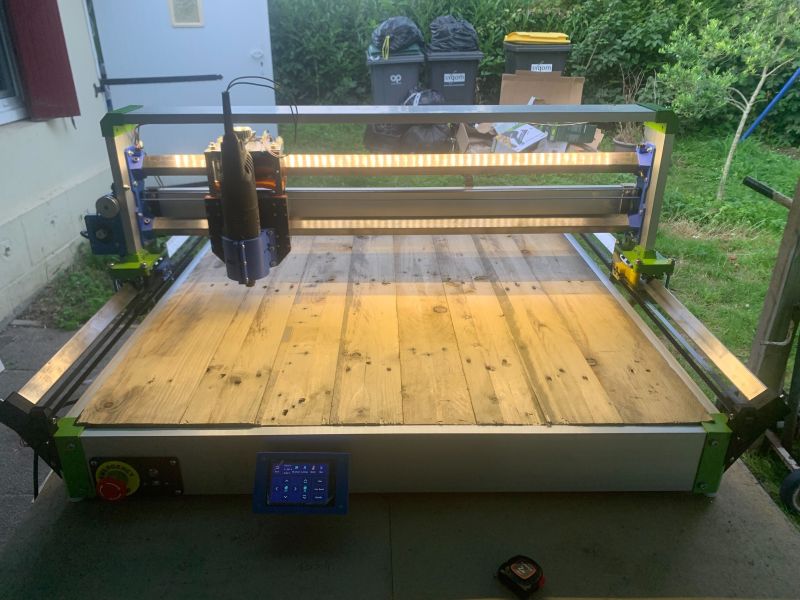
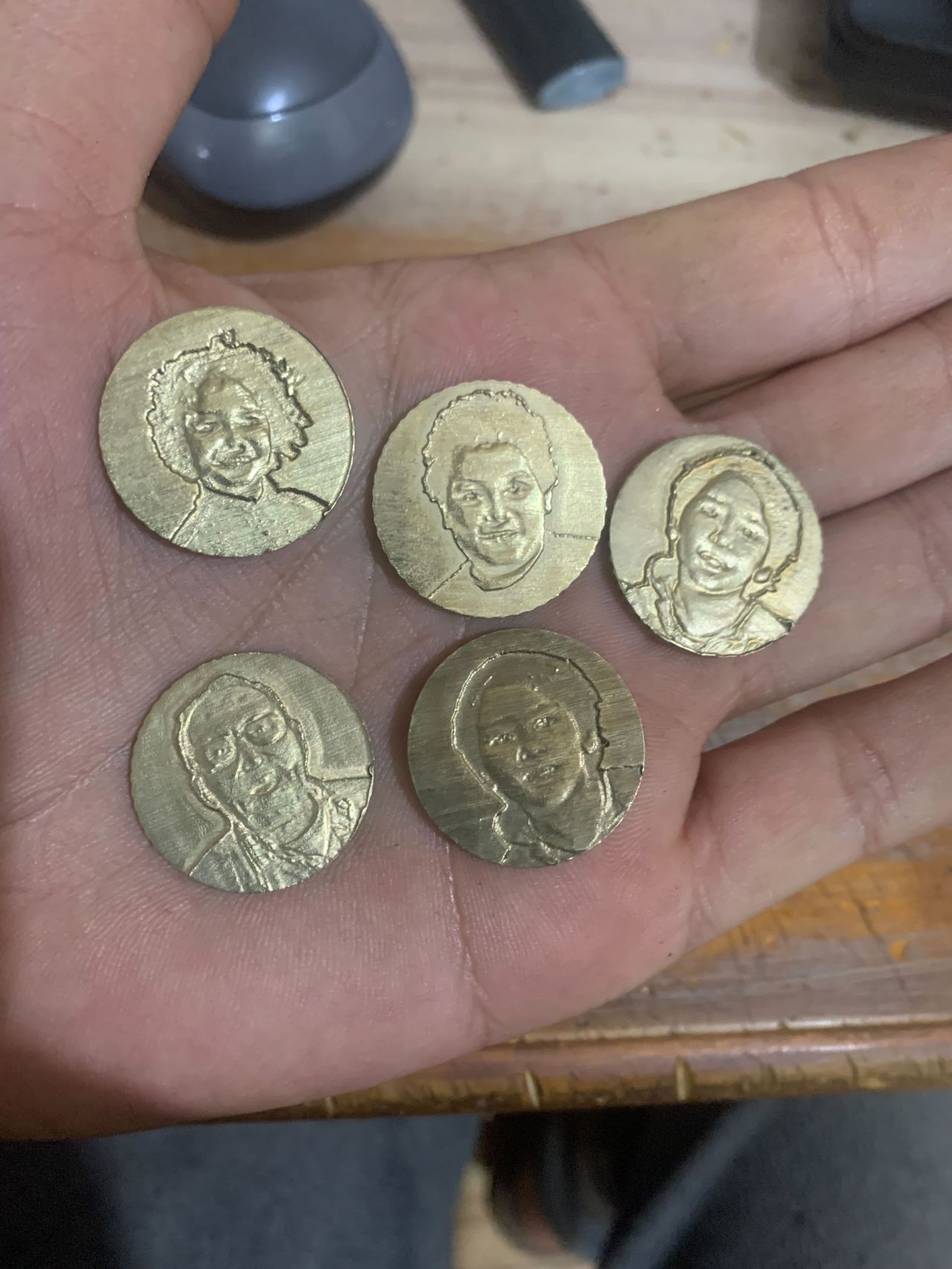
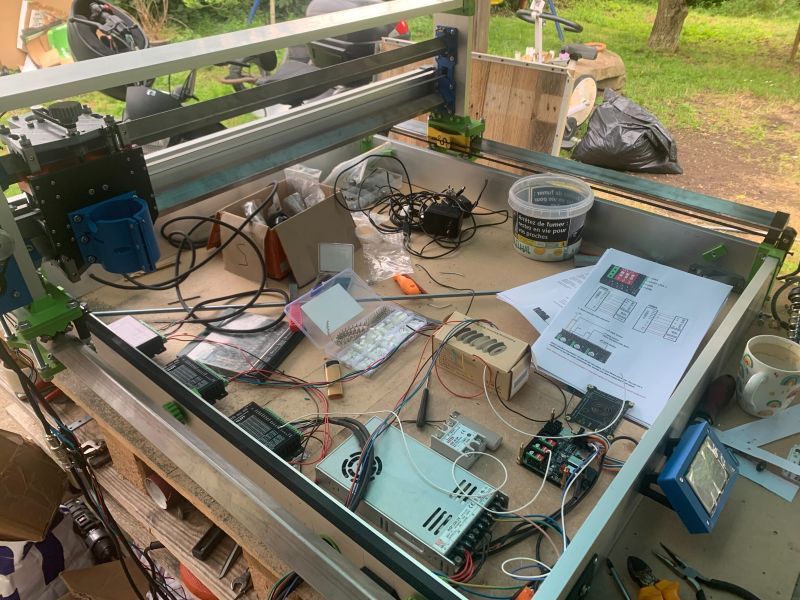
The corpus does not speak in a vacuum. The RSCNC32 is a CNC built by hand, from scratch, by Amine RAITI. The mechanical parts were manufactured with that same machine. The photos of these parts are the physical demonstration that everything this study proposes is not only possible — it has already been done. Without industrial budget. Without a team. With hands, time, and the decision to understand rather than to purchase.
RSCNC32 under construction
① Frame under assembly
RSCNC32 electronics and wiring
② Control board, drivers and wiring
Parts engraved with the RSCNC32
③ Engraved parts produced with the machine
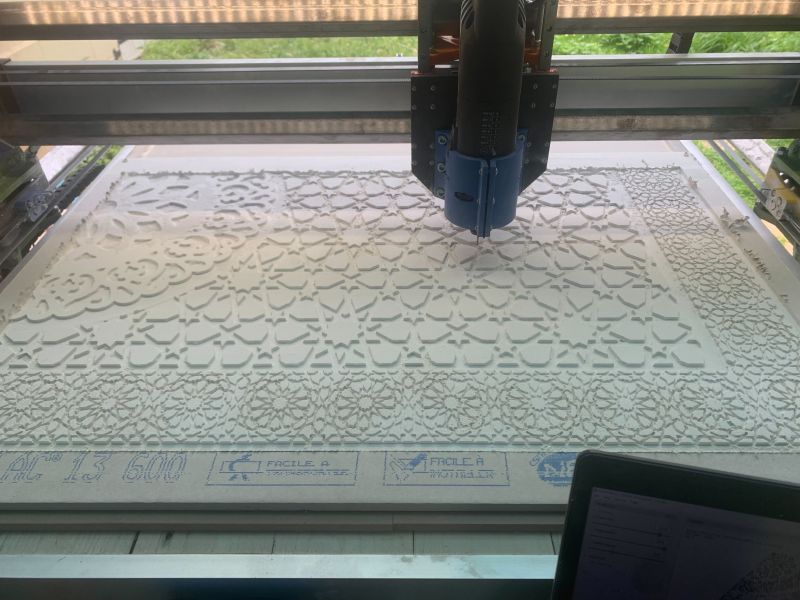
Moroccan Gibs decoration engraved with the RSCNC32
④ Moroccan Gibs decoration — engraved on the house
◆ RSCNC32 — HAND-BUILT · AMINE RAITI
CNC machine built from scratch — frame, wiring, GRBL firmware, calibration, all done by hand. The Moroccan Gibs-style decorations were engraved with this same machine on panels of the house. Proof that autonomous fabrication is possible, accessible, and already done — without industrial budget, without a team.
◆ WHAT THE HOMEMADE RSCNC32 SAYS THAT CATALOGUES DO NOT

A hardware catalogue says: here is a CNC for €200. It does not say how it works. It does not say what it means to choose between a Nema 17 and a Nema 23 motor. It does not say why the mechanical rigidity of the frame determines the precision of the result. It does not say what one learns by wiring motor drivers oneself, calculating the power supply current, installing the GRBL firmware.

The homemade RSCNC32 says all of this — not with words, with engraved parts. The student who sees these parts and learns they were manufactured with a hand-built machine understands that autonomous fabrication is possible. Not reserved for diploma-holding engineers. The hands that know precede the title that says so.

◆ THE M'ALLEM AND THEIR MASTERPIECE — THE COMPAGNON LOGIC

In the Compagnons du Devoir tradition, the master shows their masterpiece before asking for the aspirant's. Not vanity — pedagogy. Proof that the path has been walked, that the result is real, that transmission is possible. The RSCNC32 is that masterpiece in the context of this study. It says to the student: here is what your hands can produce. Not in twenty years after a degree. In one school year, with a pooled teacher budget.

◆ NASSIHA — THE BUILT MACHINE UNDERSTANDS THE BOUGHT MACHINE BETTER

The student who has built a CNC — even simple, even imperfect — understands why the purchased CNC has those dimensions, those tolerances, those limits. They do not use it as a black box. They use it as someone who knows what is inside. This is the difference between the operator and the maker. Between the DevOps who uses the cloud and the SRE who knows what is under the cloud.

HUMAN
5
SECTION 5 · SECONDARY AND SIXTH FORM — PROGRESSION BY LEVEL
FIVE YEARS · FIVE LEVELS · ONE COMPLETE CHAIN
◆ YEAR 7 — ARDUINO (LED, sensor)

First contact. Code → electrical signal. The LED as revelation. Deamputation begins here. Each student alone with the kit.

◆ YEAR 8 — LASER ENGRAVER

Name tag project (45 min). Student draws in Inkscape, generates G-code, engraves on wood. Object to take home. Door for girls: leather jewel, personalisation.

◆ YEAR 9 — CNC3018 (3 modes)

Same G-code, three results. The XYZ coordinate system becomes real. Router, laser, pen. The student understands code is neutral — the tool decides.

◆ YEAR 10 — 3D PRINTER

Creation ex nihilo. FreeCAD modelling → Cura → Ender-3. Volume, gravity, supports, tolerances. The deepest understanding of the code-object link.

◆ THE ANNUAL PROJECT — YEARS 11-12 — BUILDING THE MACHINE

The most ambitious and most formative level. A group of 4 to 6 students builds an open source CNC or 3D printer over the school year. What this project teaches:

Stepper motors: current, torque, angular step, driver. Understanding that 200 steps = 1 turn = precise displacement of Xmm according to the lead screw pitch. The physics of positioning.

The control board (GRBL / Marlin): Arduino firmware that receives G-code, decodes it, and sends pulses to the drivers. Students recognise the Arduino from year 7 — it is now the brain of a machine.

Power supply: each motor consumes. Each driver heats. Each power supply choice carries responsibility. Miscalculating the power supply breaks hardware. The physics of power becomes an engineering decision.

Mechanics: machining precision, mechanical play, frame rigidity. A misaligned axis produces a badly engraved part. Code does not compensate for faulty mechanics.

HUMAN
6
SECTION 6 · THE ANNUAL PROJECT — WHAT THE STUDENT UNDERSTANDS THAT NOBODY ELSE DOES
BUILDING THE MACHINE — THE FIRST MASTERPIECE

There is a fundamental difference between the student who has used a CNC and the student who has built one. The one who built it knows what is inside. They do not use a black box — they use something they understand at every level. This difference, twenty years later, is the difference between the engineer who configures a cloud service and the engineer who understands what the cloud service hides.

◆ ANNUAL PROJECT SCHEDULE — CONCRETE MILESTONES

September-October — Architecture: choose the open source model (MPCNC, Voron, Prusa i3). Read the documentation. Make the parts list. Calculate the budget. Divide roles — mechanical, electronics, firmware, testing.

November-December — Procurement and mechanics: order parts (AliExpress, local suppliers). Print missing parts on the school's printer. Assemble the frame. Understand why frame rigidity determines final precision.

January-February — Electronics: wire the drivers, motors, end stops, power supply. Identify wiring errors (short circuits, wrong polarity). Understand why a poorly cooled driver overheats and cuts out.

March-April — Firmware: flash GRBL or Marlin. Configure parameters — steps/mm, motor current, maximum speed, acceleration. Run first homing and first manual moves.

May-June — Calibration and masterpiece: engrave the first real part. Correct it. Redo it. Present the machine to other students and teachers. The machine stays in the school — it will be used by students in future years.

◆ THE MACHINE STAYS — TRANSMISSION BEGINS

The machine built by year-12 students stays in the school. Year-10 students will see it, use it, perhaps improve it. Year-11 students will maintain it. This is compagnon transmission applied to the state school. The masterpiece does not disappear with the cohort — it becomes the tool of the next one.

HUMAN
7
SECTION 7 · POOLED BUDGET LEVEL 2 — COMPLETE INVENTORY
€2,400/YEAR · €1,080 FOR MACHINES · €1,320 RESERVE
◆ INVENTORY — WHAT €2,400/YEAR BUYS (MACHINES + ARDUINO)

20 Arduino Starter Kits (documented in "Deamputation at the Source"): €700 — class of 20 students, hardware reusable 5 years.
5W laser engraver (xTool D1 or equivalent): €150 — engraves wood, leather, cardboard. Immediate, beautiful, personal result.
CNC3018 Pro (3 modes: laser + router + pen): €180 — the pedagogical machine par excellence. Three modes, one G-code.
3D Printer Ender-3 V2: €250 — creation ex nihilo. Robust, documented, huge support community.
Open source CNC build kit (MPCNC or equivalent): €200 — Nema 17 motors, A4988 drivers, Arduino UNO board, aluminium profiles, hardware, belts.
Year 1 consumables: €300 — plywood, PLA filament, slate plates, leather, wiring, breadboards.
Software: €0 — Inkscape (vector), FreeCAD (3D), Cura (slicer), GRBL (CNC firmware), LaserGRBL (laser control). All open source, all free.

Total machines: €1,080
Year 1 reserve: €620 (additional consumables, spare parts, contingencies)
Year 2 reserve: the full €2,400 of year 2 goes entirely to consumables and improvements — the machines are already there.

◆ WHY THIS BUDGET — AND NOT A GRANT APPLICATION

This pooled budget proposal is deliberately independent of any administrative process. No project call. No academic dossier. No application to a local council, regional authority or ministry. These channels exist — and they can complement this arrangement if they succeed. But they take time that children do not have: the bifurcation of year 7 does not wait for a ministerial decree.

The pooled budget says one simple thing: we are responsible for what happens in our classrooms. We are not waiting for anyone to act.

The parents' association — a natural complementary lever: parents have a direct and legitimate interest in their children's education. A parents' association that decides to fund digital fabrication equipment is not organising a school fair — it is investing in the technical future of its children. A voluntary contribution of €5 per family from 50 families adds €250 to the annual budget. From 100 families: €500. Without any additional administrative structure. The parents' association already exists in every school — it only requires teachers and parents to decide together that this priority is worth it.

◆ THE COMPLETE CHAIN — FROM LED TO SOVEREIGNTY

Year 7: Arduino + LED → code controls electricity.
Year 8: Laser engraver → code controls light, which engraves matter.
Year 9: CNC3018 → code controls XYZ axes, which shape matter.
Year 10: 3D Printer → code creates matter ex nihilo.
Years 11-12: Build the machine → the student understands what all machines hide.

The student who has traversed this complete chain understands, at 18, what most software engineers do not understand at 30: that code does not exist in a vacuum — it exists to transform matter. That technical sovereignty begins in the hands. That the metal precedes the code.

◆◆◆
NEMO SUPRA LEGEM EST